# Repay borrow

Repay borrow typically involves repaying the loan by providing additional collateral. Any unused collateral that has not been utilized for repaying the loan will be available to the borrower on the platform.

You can repay the loan anytime you want to:

* Go to "your borrow" page.&#x20;

<figure><img src="https://4193496741-files.gitbook.io/~/files/v0/b/gitbook-x-prod.appspot.com/o/spaces%2FmSEPGvjxP2TkRySjdtoI%2Fuploads%2FcImFmHNrvCeYe86wcAyC%2FScreenshot%202025-05-12%20at%202.37.41%E2%80%AFPM.png?alt=media&#x26;token=4b93db68-0e35-4e68-9cb8-e735ce4b19f4" alt=""><figcaption></figcaption></figure>

* In your borrow section, select the ID you want to repay the borrow for and click on "Actions" button.

<figure><img src="https://4193496741-files.gitbook.io/~/files/v0/b/gitbook-x-prod.appspot.com/o/spaces%2FmSEPGvjxP2TkRySjdtoI%2Fuploads%2FxejSZbP8I0GZxXP5h4D3%2FScreenshot%202025-05-13%20at%2012.25.45%E2%80%AFPM.png?alt=media&#x26;token=f36e1604-b44e-4e7a-8379-79b85f2cd40b" alt=""><figcaption></figcaption></figure>

* Select the "Repay borrow" option from the dropdown menu.

<figure><img src="https://4193496741-files.gitbook.io/~/files/v0/b/gitbook-x-prod.appspot.com/o/spaces%2FmSEPGvjxP2TkRySjdtoI%2Fuploads%2FyYDUHc74eeSIwZZIwfEO%2FScreenshot%202025-05-13%20at%2012.26.55%E2%80%AFPM.png?alt=media&#x26;token=6be848b1-d343-469a-8181-0d64314a8446" alt=""><figcaption></figcaption></figure>

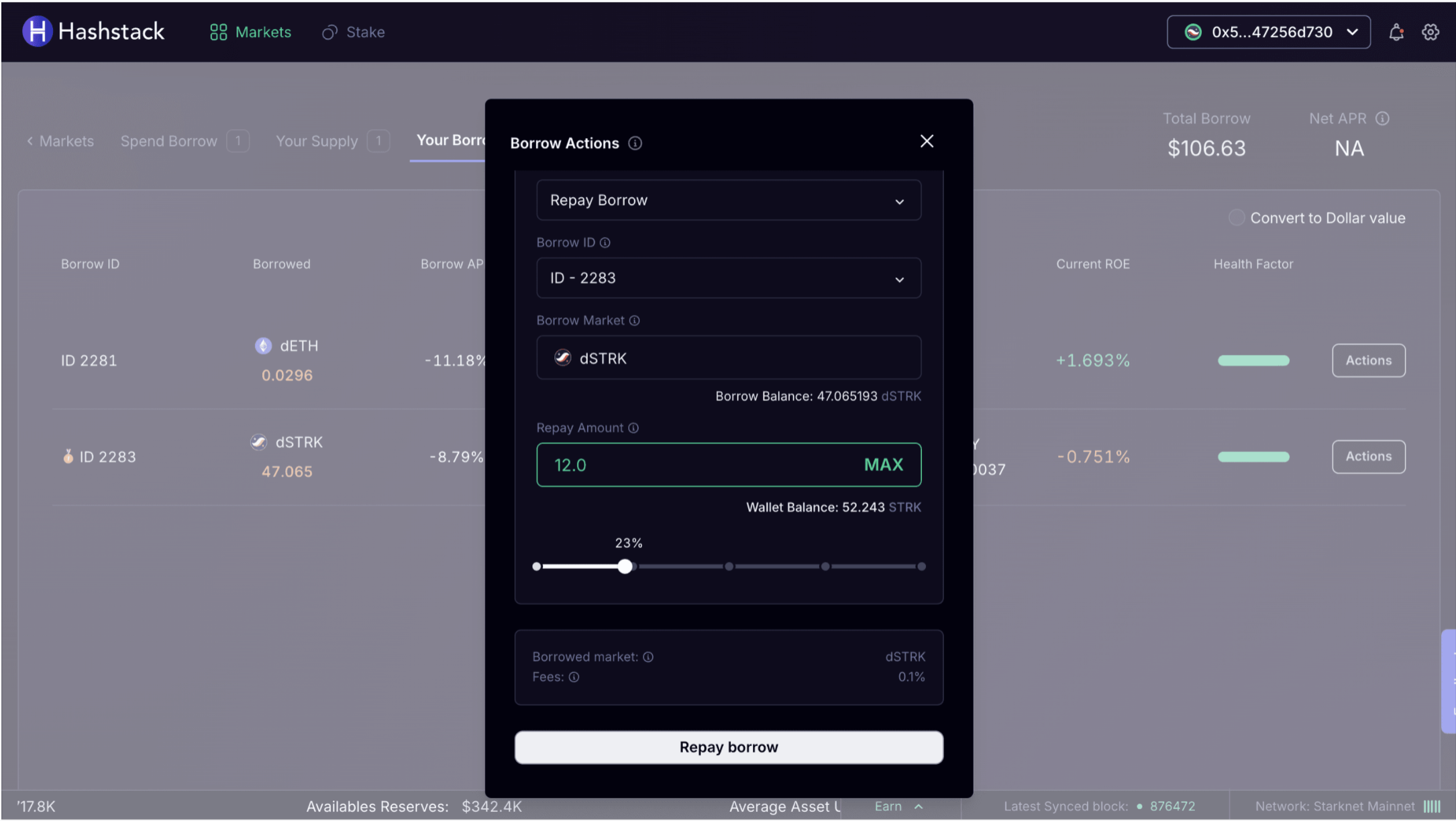
* Enter the amount that you want to repay and click on the "Repay borrow" button.

<figure><img src="https://4193496741-files.gitbook.io/~/files/v0/b/gitbook-x-prod.appspot.com/o/spaces%2FmSEPGvjxP2TkRySjdtoI%2Fuploads%2FcIEURFWZbDVf5oqiidZd%2FScreenshot%202025-05-13%20at%2012.28.08%E2%80%AFPM.png?alt=media&#x26;token=6c12cfa0-9410-4771-844c-10fe54bd9f97" alt=""><figcaption></figcaption></figure>

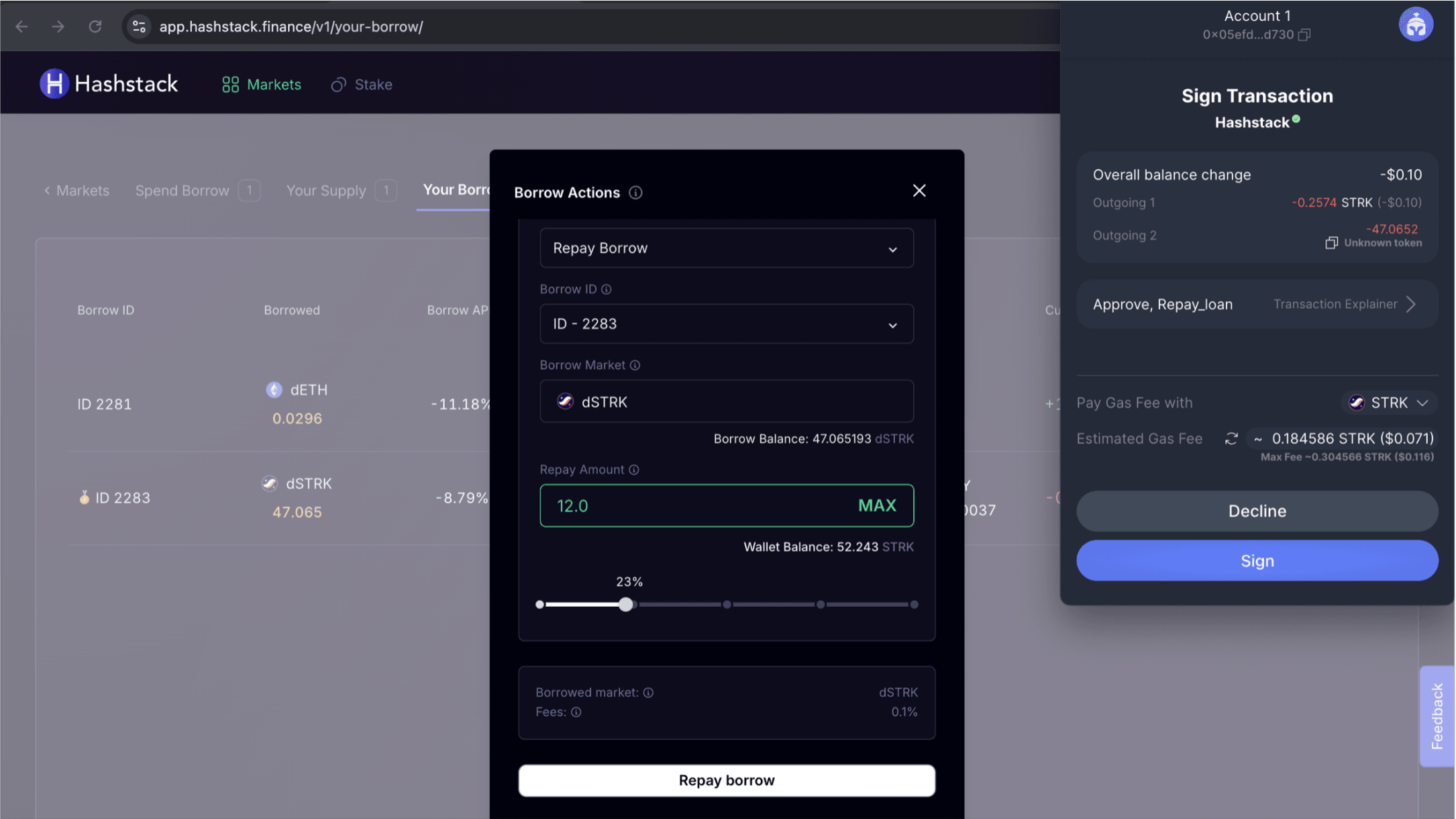
* Sign the transaction in your wallet.

<figure><img src="https://4193496741-files.gitbook.io/~/files/v0/b/gitbook-x-prod.appspot.com/o/spaces%2FmSEPGvjxP2TkRySjdtoI%2Fuploads%2FMEV3BiSz1UjQYwKC3INy%2FScreenshot%202025-05-13%20at%2012.28.55%E2%80%AFPM.png?alt=media&#x26;token=9ade1198-b33b-4a52-b2ca-a2fd7594f7a6" alt=""><figcaption></figcaption></figure>

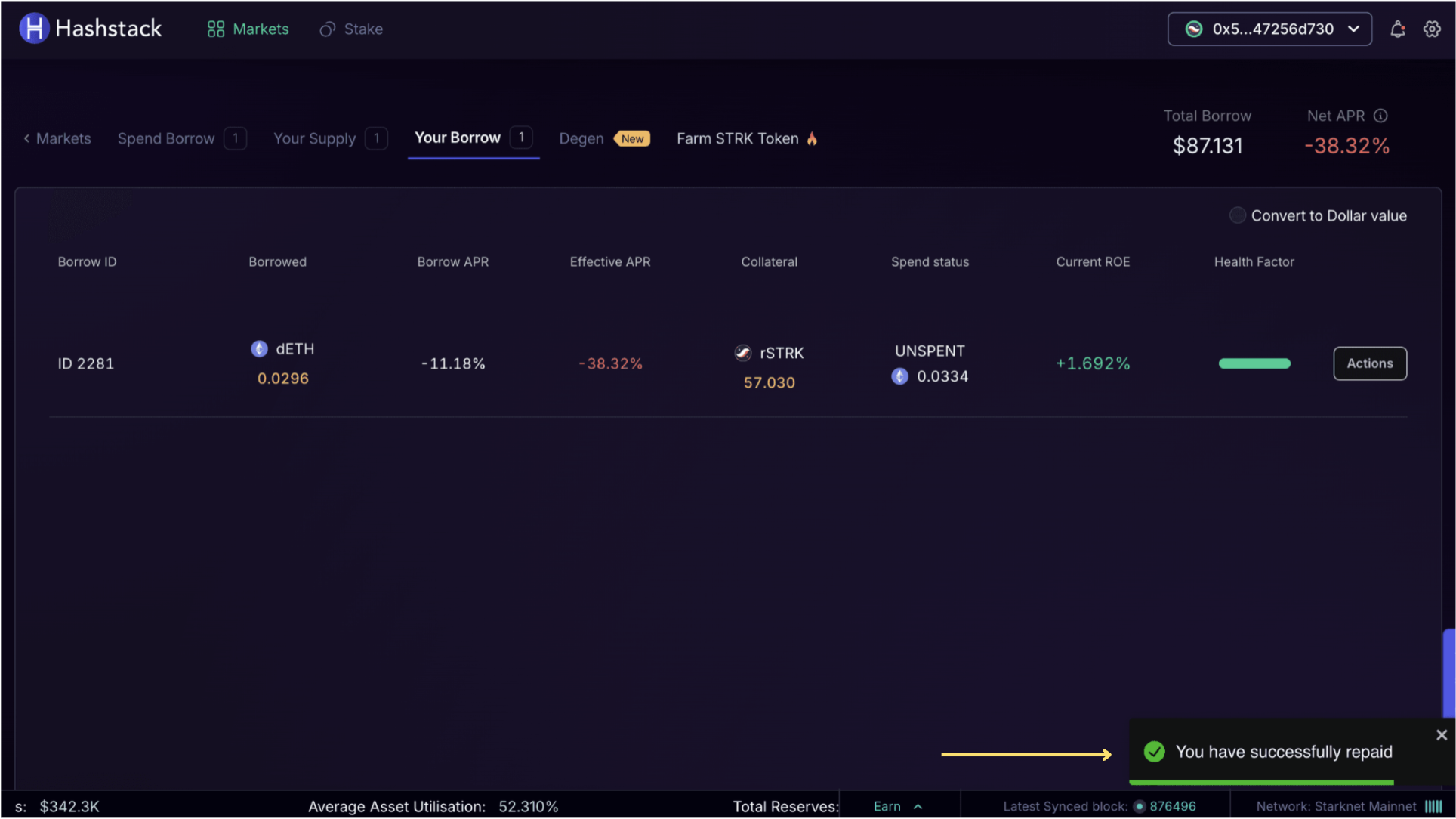
* If the transaction is successful, you will get the success notification.

<figure><img src="https://4193496741-files.gitbook.io/~/files/v0/b/gitbook-x-prod.appspot.com/o/spaces%2FmSEPGvjxP2TkRySjdtoI%2Fuploads%2F9NgnLNoHpSDoUAM5KSub%2FScreenshot%202025-05-13%20at%2012.33.25%E2%80%AFPM.png?alt=media&#x26;token=85edc3dc-d75b-4b32-8d73-e4d5e6551e38" alt=""><figcaption></figcaption></figure>

### Video Tutorial

{% embed url="<https://www.youtube.com/watch?index=6&list=PLblZGyoIK7LoaODRn52pjFsqqiA46fGeg&v=1-5G0bdeyCQ>" %}